This means there’s a small microcontroller inside the cable with information on the cable’s capabilities.
More evidence that USB-C is an insanely overengineered spec. Cables should be dumb pipes, not devices with their own active circuitry. IMHO Ethernet, while not perfect, got this part right.
The only reason the signals don’t exactly match the one above is just the orientation of the cable.
This is one of the more perplexing design decisions. Was simply mirroring the contacts too simple for them? Did someone imagine a use-case where they wanted to detect the orientation of the cable? WTF.
So how’d you safely solve having cables of (widely) varying resistance?
I appreciate having the option to choose between a thin cable for charging only, and a pretty thick (and also heavy, inflexible, and relatively expensive) one for high-speed data transfer and charging.
The only alternative to that would seem to be having different ports per device, which is infeasible in many cases, and inflexible in most others.
> Was simply mirroring the contacts too simple for them?
That would require twice the number of contacts for the same number of physical wires, which would make the plugs even larger.
So how’d you safely solve having cables of (widely) varying resistance?
Smartphones already do this. They essentially measure the resistance of the cable by measuring the voltage and correlating it with the current drawn, and regulate the current accordingly.
That would require twice the number of contacts for the same number of physical wires, which would make the plugs even larger.
No. Look at the pinout. It's not symmetrical. They could've made it perfectly symmetrical.
>Smartphones already do this. They essentially measure the resistance of the cable by measuring the voltage and correlating it with the current drawn, and regulate the current accordingly.
No! Where did you hear this?
Smartphones usually either rely on type-c pd nowadays or do far less standard Samsung/Apple resistor on usb line check.
Some power banks also do terrible thing where they increase current pull until they see voltage starting to collapse but that’s to check for OC limits on load switch. However that’s really starting to go away because type c just works
It's been common for many years. Look for a document titled "Mediatek Pump Express Introduction". Another useful phrase to search for more information: "cable impedance detection". Apparently several patents on it too.
"Do cable imp. Calculation. Protect cable from burnout" on page 12
"Adjust Vbus according to cable impedance/quality" on page 14
and "Cable Impedance Measurement" on page 15?
Pump Express is their fast charging protocol, but even before that, in the days of feature phones, they were already doing the measurements and adjusting charging current.
> Smartphones already do this. They essentially measure the resistance of the cable by measuring the voltage and correlating it with the current drawn, and regulate the current accordingly.
Not sufficient. It’s easy to have a cable where the long conductors can safely carry a lot more current than the terminations. Or one could have a 1 foot thin cable connected in series with a 10 foot thick cable.
For that matter, a short low-ampacity cable would look just like a long high-ampacity cable.
It's not resistance per se that you care about, it's how much the cable is heating up which is mostly dependent on resistance per meter.
Imagine 2 cables with the same resistance, one 0.5m long and the other 2m. At a set amount of amps, the 0.5m long cable would need to safely dissipate 4 times as much heat than the 2m cable over the same distance. And you don't know how long the cable actually is (and they make 10cm usb cables after all) so you can't make any decision based on resistance that doesn't risk some cables going up in flames.
Fortunately copper and aluminium, the two most common metals for cables, have resistance that increases with temperature.
Ultimately what I'm saying is that the endpoints have or can measure all the information they need to adapt, and this is even more accurate than requiring a cable to self-identify which is worthless if it's lying (and that can happen unintentionally if it's damaged or the connector is worn.)
Yes resistance goes up the warmer the cable gets, but you know neither the resistance of the cable at 20°C nor the temperature of the cable. Simple example, say the user is charging their phone, you detect the cable getting plugged in and measure the resistance at say 1 Ohm to make the numbers nice. Cool, now at what resistance do you determine the cable is too hot and reduce the current? Copper's temperature coefficient is about 0.4% per °C so the resistance should be 1.12 Ohm at a safe 30°C increase right?
Wrong! The cable resistance you measured could already have been at 50° and you're now pushing the cable into fire hazard territory. This isn't theoretical either, people plug in different devices after another all the time (this also eliminates any sort of memorizing if you were thinking about that). So what are you just going to wait 5 minutes at safe charging current and see if the temperature goes down? That's not going to fly in a market where some devices charge 50% in like 20 minutes.
And all of this is ignoring another important design goal of usb-c: dumb charge-only devices exist and should continue to function with a minimal of extra added components. USB-C allows this with the addition of two simple resistors that set the current you want. Measuring resistance on the other hand either requires a accurate voltage source on the device side (expensive) or somehow connecting the power line to some other line (how that would work without additional control electronics I have no idea).
The copper and aluminum will not become resistive enough to make a difference at temperatures low enough to prevent the rest of the cable from becoming crispy.
I've had a phone like this - it'd increase current until voltage start to sag. It was horrible. Never again.
The difference between high-current and low-current cable was very small, so once cable got a little bit worn out, the detection was basically random. You plug cable, and get 1A charge. Unplug-replug, and it's 0.5A now. Unplug-replug and it gets 2A.
I am very glad that the system has died out and we have cables that simply report their capacity directly.
(that said yes, it could have been simpler, like having a symmetric pinout. But this would be a marginal improvement at best, as USB-IF seems to be incapable of producing simple designs. It'd still be thousands of pages of docs)
I don't think it is possible to have "good implementation" of cable impedance sensing, given the inherent properties of the connectors. Wetting current is a thing, after all, and it can be quite big for work connectors.
Cable-reported capacity does not really change over cable lifetime - the currents used to sense resistance are miniscule, and would not be affected by cable being worn. For example, extra 0.5 ohm of cable resistance completely ruins the current sensing, but make absolutely no difference when measuring 5K or 1K resistance.
And if manufacturer is lying, that's annoying but it's 100% deterministic - you know the cable is bad, you can throw it away. With impedance sensing, the same cable can be good or bad, depending on the mood, and that's why it should not be used ever.
I am very happy that I can charge my phone and laptop from the same charger, and don't ever have to worry about whether the cable I'm using will be a fire hazard.
Right but consumers are much more likely to buy a cheap USB charge cable that lies about its rating (via internal chip) than an Ethernet cable that lies about its rating on the package.
The reason for detecting the orientation of the connector is for higher speed communication. USB-C 20gbps uses both sets of pins on the connector to shotgun two usb3.2 10gbps to get 20gbps. That is why the technical spec name for 20gbps is "USB 3.2 gen 2x2". That is what the "x2" means.
Knowing that USB has this feature is follows that USB-C needs to be self orienting in case both ends of the connector plugged in different orientations.
You say Ethernet got this part right, well it got this part right by not having a reversible connector. Ethernet has 4 tx/rx pair and USB-C has 2 rx/tx pairs per usb 3 connection with 4 in total for 20gbps. The difference is reversibility. Is it worth the tradeoff?
That might work for Ethernet, but how would you do that for any unidirectional USB-C alternate mode without protocol-level feedback such as analog audio or DisplayPort video?
If you want to allow all of
- Reversible connectors
- Passive (except for marking), and as such relatively cheap, adapters and cables
- Not wasting 50% of all pins on a completely symmetric design connected together in the cable or socket
there's no way around having an asymmetrical cable design that lets the host know which signal to output on which pins.
That’s basically how USB-C does it too (except that the chip isn’t strictly necessary; an identifying resistor does the job for legacy adapters and cables).
C-to-C cables never have a resistor for identification; those are for devices or legacy cables/adapters to USB-A/B.
“Active” is also somewhat ambiguous: E-marked cables can be both passive or active in terms of what they do with the signal on the high speed data lines (such as amplifying it, converting it to optical etc.)
> More evidence that USB-C is an insanely overengineered spec. Cables should be dumb pipes, not devices with their own active circuitry.
Why, to what end? They don't add any noticeable amount of cost to the cables and it's a whole lot better of a solution for consumers then requiring all cables to carry 5 amps and thus making them thicker.
> Did someone imagine a use-case where they wanted to detect the orientation of the cable?
They didn't imagine anything, USB3.0 5Gpbs with only 2 differential pairs, like you'd have in a usb-c to usb-a cable, requires this. And you can't just connect them together like you'd do for USB2, the resulting stubs degrade the signal too much.
Honestly no excuse for this to be done wrong on a $400 device. They should replace all deployed units for free. (Because you know these cost $20 to make.)
Yeah, the sticker that says "J-Link" is the expensive part. That's why $1.99-on-AliExpress level hardware mistakes are inexcusable. (I mean, a bug is a bug, they happen. But you've gotta make it right.)
The price is not too surprising --- the margins are insane on many embedded development tools, although the stuff coming out of China is slowly trying to change that. The most expensive part of this device is the MCU which is around $15, but comparable ones from other manufacturers are <$5.
Plenty of manufacturers understand USB-C well enough to get this right.
Out of what must be dozens, I own a total of two devices, and have encountered one more, that have this kind of mistake in their design; except for the Raspberry Pi 4, I’m not surprised based on the quality and price of the device.
Did I get this right? some cables have an MCU that gets power through a 1K series resistor on CC2? That MCU also sources ground through the cables GND?
The USB-C step is humongous, and hard to implement.
the complexity is high, but how else can you tell a cable that supports USB4 (40GBps) from one that’s only good for charging your phone (and everything in between)? users aren’t going to be able to tell the difference (using a cable with no data lines is already a super common issue with people getting into MCUs) so the device needs to be able to tell how much data and power the connected cable can distribute automatically.
this also why usb-c extension cables (M-F) aren’t spec complaint
it’s a real cool port, but the complexity demon is definitely present in the spec :)
I’m not sure if e.g. Displayport even has the capacity for link training (and there are USB-C to Displayport cables that have to support legacy devices that know nothing about USB); HDMI (until 2.2 or so) definitely does not.
It’s ok to not agree with the USB-IF’s tradeoffs in their solutions, but denying the complexity of the problem space can be a hint that you don’t sufficiently understand it to pass that kind of judgement.
Intel has a flow for how link training is done on DisplayPort.
Probably shouldn't be surprised but it involves communicating over the AUX channels. Is this something that a sizable % of computers can do? For some reason I thought aux channel was semi free for use, that it could be for Ethernet or USB in a pretty naked form. Didn't realize that needed mode switching?
Ah, so maybe DisplayPort has mandatory link training then, which would indeed allow unmarked cables.
But to GPs point, there still needs to be a way to tell the source that a given cable is a USB-C-to-DisplayPort one in the first place. So why not include the metadata on what signal grades it’s rated for in that same indicator? That’s exactly what e-markers are.
This means cable might start at speed which is too high and get horrible errors if the cable is bent.
And even with Ethernet, that autorating has plenty of downsides. I've had a cable which I accidentally nailed through, so sometimes it could only connect at 10Mbps. It took me a long time before I realized it needs to be replaced, precisely because it'd just downshift instead of throwing any errors.
Could this be done in software? I'm very uneducated on the topic but doesn't your computer need to know the capabilities of a cable when it's plugged in? (USB speed, PD support, etc.)
At least for e-marked cables, this seems possible, and once the other side is plugged in at well, it should be clear to the controller what it is and what type of cable connects the two devices (only 2.0 cables supporting at least 3A/20V are allowed to not have a marker per the spec).


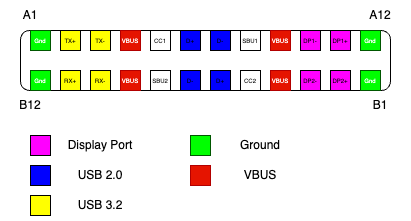
More evidence that USB-C is an insanely overengineered spec. Cables should be dumb pipes, not devices with their own active circuitry. IMHO Ethernet, while not perfect, got this part right.
The only reason the signals don’t exactly match the one above is just the orientation of the cable.
This is one of the more perplexing design decisions. Was simply mirroring the contacts too simple for them? Did someone imagine a use-case where they wanted to detect the orientation of the cable? WTF.