I've not had any problems with swapping out systemd-* with other packages, including -coredump, -cron, -oomd, -resolved or -timesyncd. Even journald was fairly painless to swap out. Unlike systemd itself, the distros' approach them not so much as a core part of the userland, but as lightweight basic implementations that meet many user's needs, but which are in no way a replacement for more fully-functional implementations.
(used it before, mostly to learn. went to debian for new laptop. gave up after fighting systemd.
I'm aware of devuan and artix, but gentoo just worked (after all the time spent))
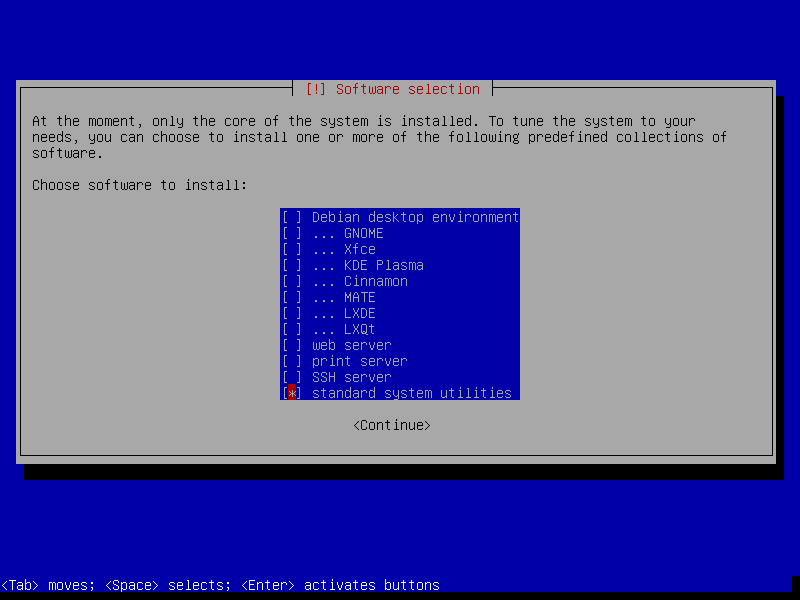
Debian, at least until bookworm works perfectly without systemd. The easiest way to make this transition, is to installed Debian with nothing but 'standard system utilities' and 'SSH server' (if you want) during install:
It's important to remember that it has to be this aggressive in excluding systemd, too. There is quite a lot of strong coupling amongst the parts of systemd, so there are very few half-measure scenarios, where one can have only some systemd stuff, that will actually function correctly in toto.
Moreover, there are the odd one or two unrelated packages that just happen to have the string "systemd" in their names. (-:
MX Linux for the win. Debian based, but defaults to 'init'. Booting with systemd is an option. Just enough systemd-* running to make things easy and seamless.
  $ ps agxf|grep 'systemd'
      607 ?        S      0:00 /lib/systemd/systemd-udevd
     2201 ?        S      0:00 /sbin/cgmanager --daemon -m name=systemd
     2726 ?        S      0:00 /lib/systemd/systemd-logind
I’ve been dropping systemd-timesyncd and using chrome since forever, and it works well. I’m sure some systemd-* things are harder to replace, but not every replacement is a fight against your distro.