These days CPU vs GPU isn't about the number of ALUs or cores, it's about the latency hiding strategy. A GPU assumes oodles of similar threads are running at the same time, so the moment one blocks on a memory access another can be rotated in. It's hyper-hyper-hyper-hyper-...-hyper threaded. Meanwhile, a CPU is just hyper-threaded, if that, and instead it tries to be clever about prefetching, speculative execution, and the like.
So long as some important applications have tons of similar threads and some have very few threads, it will probably make sense to specialize.
Yep, I see it as latency vs throughput optimisation, particularly wrt memory subsystem. What I was pointing out is, x86 is not well suited to GPU execution; Intel tried that with Larrabee. Moreover, in the latest generation Nvidia chips you have 72-96mb L2 cache and 2.5ghz+ clock speed, so it's remarkably capable per-thread.
At some point, and I think 256 cores might be the ballpark, you're committing to using so many threads that you're probably mostly interested in high throughput. (I'm writing commercial path tracers so my bias is obvious!)
one thing with high that cpus is you can use them to claw back against OS latency. you can do things like pin 128 cores for your application, 64 for your networking, 32 for disk IO and 32 general purpose, and keep the OS from scheduling other programs on the critical cores for running your program.
There is really significant convergent evolution between x64 and amdgpu. An x64 core running two threads is very like a gpu core running four threads from a stack of a hundred or so.
One speculates to hide memory latency, the other shuffles threads between cycles to hide memory latency. One has ~64 byte wide vector ops, one has ~256 byte wide vector ops.
I have a pet theory that the significant difference is the cache coherency model.
I'm probably forgetting some vital details, but isn't that getting similar to Larrabee? As I recall that was where intel seemed to be exploring other uses for their Atom CPUs and were trying to push as many as they could into one processor.
One of the uses they prototyped was a GPU, or a large multi-threaded (x86)software renderer rather than going through a regular 3D acceleration API. I remember reading that part of the challenge was that Larrabee was a system itself, so a developer needed to boot something like BSD before providing it with code to get useful output. This was around the time AMD was experimenting with 'fusion' after their purchase of AMD, and exploring how to push different different parts of an application to the relevant processor in their CPU+GPU products.
That's in addition to the other Xeon Phi accelerators they did. Obviously Sierra Forest is a regular CPU, but it seems there's a bit of "history doesn't repeat, but it rhymes"
The big difference is that CPU cores are truly independent. GPU "cores" aren't, a group must be running exactly the same instructions at exactly the same time, and they share registers.
Also, CPU cores tend to have speculative execution, GPUs don't.
So long as GPU threads have to run in a warp, they will be fundamentally very different from a CPU core, no matter how weak, strong, or power efficient.
I wonder how Linux deals with lots of cores with large-ish scratchpads. You can also add lots of memory channels as well - this is not a desktop part after all - you'll find them in datacenters.
GPUs are for parallel instructions. You want to do a ton of matrix multiplication.
Multi-core CPUs are for parallel processes. You want to host a ton of virtual machines and they all care about branch prediction and cache latency more than throughput.
> Hopefully this will encourage a 256 core from AMD.
The limit on this is clearly power. Right now you get 128 cores for 360 watts -- less than 3 watts per core. SP5 can provide up to 700W, so they could do it if the demand is there.
edit: Damn it Wikipedia, it's only 700W for 1ms. So they might need a more efficient process or a new socket.
AMD already has a 128 Core CPU or 256 vCPU with Hyper threading. We are expecting Zen6 in 2nm and 256 Core in 2026.
With 2U2N and Dual Socket per node, that is a potential of 2046 vCPU per 2U unit. All the problem with Web App Scaling can be resolved much cheaper with fewer server to manage.
> Initially announced in February 2022 during Intel's Investor Meeting, Intel is splitting its server roadmap into solutions featuring only performance (P) and efficiency (E) cores. We already know that Sierra Forest's new chips feature a full E-core architecture designed for maximum efficiency in scale-out, cloud-native, and contained environments.
When they say splitting like that, do they mean there won’t be chips that feature both?
Xeons with homogeneous big cores and Xeons with homogeneous little cores… why not call it Knights Forest?
For servers it makes no sense to have hybrid CPUs with heterogeneous cores.
Where needed, you can put in the same rack several servers with big cores and several servers with small cores, in a proportion appropriate for the desired application. When the big cores and the small cores are in different sockets and they do not share coolers, the big cores can achieve maximum speed without being slowed down by the heat produced by the many threads that might be run simultaneously on the small cores.
AMD already has both server CPUs with big cores (Genoa and Genoa-X) and server CPUs with small cores (Bergamo and Siena). AMD's strategy seems wiser, because their small cores are logically equivalent with the big cores, but they have a smaller size and a better energy efficiency due to a different physical design.
Intel's strategy of implementing distinct instruction sets in the big cores and in the small cores is an annoying PITA for software developers.
The main uses I’ve seen for extra, light cores are redundancy against hardware failures, physical isolation, and I/O coprocessors. (Other than strictly using them for low-power operation that is.)
For redundancy like NonStop pairs or secure decomposition, the IPC must be really fast so they can work in lockstep or pipelines.
For I/O processors, the efficient one can handle interrupt processing while the performance core focuses on main application. Like in a mainframe with the hardware more condensed.
A separate socket per logical domain with its IPC overhead might not be as cost-efficient as heterogenous CPU’s. That’s also before I consider putting the new chips in existing, low-cost servers with all servers having the same chips. That might have cost and management benefits on top of it.
Knights featured AVX512F and were best at heavily SIMD workloads.
Sierra Forrest is bad at these jobs of workloads, lacking AVX512 and having only 16 byte execution units, so their AVX(2) throughput is also poor.
Anybody know the details of how these large chips are organized? Are they still in quartets of cores that share an L2, like the E-cores in recent desktop parts? What kind of ring, grid, mesh or whatever connects them?
I don't think Intel has revealed that officially yet but I expect each die has 36 tiles and each tile has four E-cores sharing an L2. The mesh and L3 are probably the same as in Granite Rapids.
Btop just diplays one cpu line. Htop is actually broken on systems with more than 64 or so cores... you have to reconfigure it on a host with fewer cores then copy the configuration over because the cores drive the setup options off the screen.
I know you said that as a joke, but my work machine with 32GB of RAM is constantly being eaten alive by svchost.exe and the only thing I can do is reboot once a day to keep it from ballooning out of control.
I really don’t get why the industry is still on Windows for the most part. I wish my company would just standardize on some supported variant of a Linux Desktop and be done with Windows once and for all.
svchost.exe is literally what the name implies. It's a generic service host. You pass it a dll and an entrypoint (via command line arguments and registry keys) and it runs it.
You should look at which thing it's actually running to see what's using all your CPU.
I went to help desk cuz I was being lazy, but Help desk was unfortunately kind of useless. They just wanted to reimage my machine and I haven’t had the time to go that route yet. I’m always busy. I did a bit of investigating with ProcMon recently but I really need to spend more time on it. As always, it comes down to time with these things.
These articles were great by the way! I’ve never gotten significantly down and dirty in svchost, so these were a treat to read. I much appreciate the effort in your response. Have a pleasant day!
> my work machine with 32GB of RAM is constantly being eaten alive by svchost.exe and the only thing I can do is reboot once a day
Maybe you're self-employed and unsuccessful in troubleshooting this yourself, but that sounds like a five-minutes-with-a-first-line-support-technician problem.
If you don't have a tech support department to turn to (or if they are incompetent), investigate the process with ProcessExplorer from Sysinternals to find out what that service host process is running and go from there.
The industry is still on Windows because it's easier to manage in a corporate setting. And usually better for software compatibility.
This presupposes that identifying the problem is the 1st step to fixing it. In many professional settings, convincing someone that the problem needs to be fixed is the actual problem to solve.
I had a near equivalent problem where my Windows desktop was brought to its knees by an instance of Glassfish running on it by some sort of policy. We did embedded development, low level stuff like data plane processing via FPGA. Internal IT spent 1/2 an hour trying to convince me that Glassfish was an essential part of my development stack.
I never bothered to convince them to solve the morning 9 AM virus scan of every file on disk. I just hung out in the break room for the 45 minutes it took while the UI was almost totally useless
At some point you just have to accept that if an employer really, really, really insists on paying you to do nothing while they prevent you from using a vital tool they issued you... well, that must be what they want. They're paying the bills and are in control of that entire chain of decision-making, after all. Let 'em pay for it if that's what they want.
That’s an infantile attitude, you are suppose to take responsibility for your work environment.
Speak to the manager of your manager, and if that doesn’t work, to the manager of the manager of the manager. If that does not work, write a handwritten letter to the CEO and deliver it. If the CRO knew about this, they would definitely fix it! Don’t forget a a wax seal, they love those!
Oh, you should try. I just don't think heroic efforts are in order. If you say "hey, this thing is wasting a bunch of my time, are you sure you want to do that?" and they say "yes"... well, alright.
Thanks for the response. Unfortunately, help desk just wants to reimage rather than troubleshoot and I don’t have the time available to wait for that lately. Yeah I poked around a little with procmon and procexp64, but definitely not enough.
Actually that reminds me, I right-clicked the svchost instance using the most memory and noticed the restart option, I was in an “f it” mood, so I clicked restart to see what would explode. Didn’t seem to have any negative effect that I could notice at the time. Memory usage instantly dropped by 6GB.
svchost.exe isn't a service itself, but rather, as the name implies, it's a host for other services. In other words, it's not necessarily Windows misbehaving, but a particular piece of software you're running.
Find the PID of the svchost.exe process that's eating CPU in Task Manager. Then go to the Service tab of Task Manager and find the service with that PID. You'll have your actual culprit of what's eating CPU. It COULD be a Windows service that's acting up, but it's just as likely some 3rd party service.
Haha this is true. Help desk is of the “not going to waste time and just re-image” mentality, so I decided not to nuke the next couple days of productivity setting it all back up.
With Linux these gremlins tend to be a bit less of a problem in my, gosh 20 years of IT experience. 20 years, wow! Am I really that old? Dear god. Where does the time go?
Many moons ago my first job in the industry was working in an IT department for a technical college; this was the days of windows 98/xp and Novell netware;
Even then unless it was a trivial issue, it was often a simpler fix to just re-image (or swap out hardware if we happened to have new ones available) - because most people had zero custom software installed (except for the 8 different IE toolbars they had somehow installed but swear appeared automatically) and after all, its windows: restoring from a clean image meant the machine would suddenly have that new car smell again and it'd likely last longer until the next issue would pop up.
For people with custom software there was usually more leeway to troubleshoot problems - particularly if it was stuff that needed one-off configuration.
I do feel your pain but having been on the other side of that fence I also feel their pain.
In my case (non US, government owned IT company), they make every developer use Windows because someone is getting paid to make the purchase, that's it. Once the machines arrive, every single dev erases the OS and put his preferred version of Linux on it. And that's why my country is the s*t hole it is.
If linux (devs) could just swallow their pride and embrace some heavily windows influenced design choices I am confident linux could see widespread adoption. This would finally create the incentive for product developers to actually create and support linux based products.
People really want to get away from windows. But they really really don't want to deal with an OS that feels like it's 1990.
> But they really really don't want to deal with an OS that feels like it's 1990.
I'd rather a 1990 feel than the current feel where everything is flat and it's not obvious what's interactable and my 27" 4K monitor is 90% whitespace.
They are using a successor of the N100/N305 cores, which is said to be significantly improved.
It is likely that the cores of Sierra Forest have a microarchitecture very similar to the small cores of Meteor Lake (the big cores of Meteor Lake are almost identical to the big cores of Raptor Lake/Alder Lake, but its small cores are improved).
Compared to the small cores of Meteor Lake, the cores of Sierra Forest will support some additional instructions. Most of them are some instructions previously available only in the server CPUs that support AVX-512, but in Sierra Forest (and also in the next desktop/laptop CPUs, i.e. Arrow Lake/Lunar Lake) they are re-encoded in the AVX instruction format (i.e. using a VEX prefix).
Kinda, it turns out SMT has lots of security pitfalls and having many tiny single thread cores vs. some heavily threaded cores works better in practice. (I love the niagara chips, I had a T1 and T2 box for a bit!)
So... not really? I mean, The T1/T2 devices are superficially similar, being a "big" collection of "small" cores in an SMP configuration and targeted at datacenter markets.
But the ideas behind Niagra weren't about scale per se, it's was about the idea of using extremely wide multithreaded dispatch to get high instruction throughput out of a simple (and thus small) in-order CPU core. Normally you'd expect such a core to spend most of its time getting stalled on DRAM fetches, but with SMT you can usually find another instruction to run from another thread, so the pipeline keeps moving.
The Intel E-cores in this device aren't like that at all. They're smaller than the P-cores, but are still comparatively complicated OOO designs intended to avoid avoid stalls via parallel dispatch.
Neither is IBM, to be fair. POWER is in a lot of ways an exercise in "throw as much junk into the part as we can with no thought to efficiency and see what the benchmarks say".
But surely the idea is the same: SMT hides memory latency with parallelism just like lots of load/store units do, so why not both? Datacenter loads that IBM cares about are very often fetch-limited (e.g. queries into a database RAM cache are basically guaranteed not to be nicely L1-cache-local), so maybe the numbers work out. Seems wasteful in traditional/consumer scalar loads for sure.
> no thought to efficiency and see what the benchmarks say
IBM's slides at HotChips say Power10* was designed for energy efficiency, a 3x better than POWER9 for whatever that's worth. Unfortunately, I can't seem to find a TDP for it. Or benchmarks vs x86-64 server in terms of raw performance or performance / watt.
Niagara-style (at least T1) design would have never worked in an application like this, because it compromised FPU power for the core count. 8 cores shared one FPU!
Niagara (all designs) heavily compromised single-thread performance, which could just mean time critical (5G or whatever) threads cannot complete on time.
Niagara was an interesting idea, but not great for most applications.


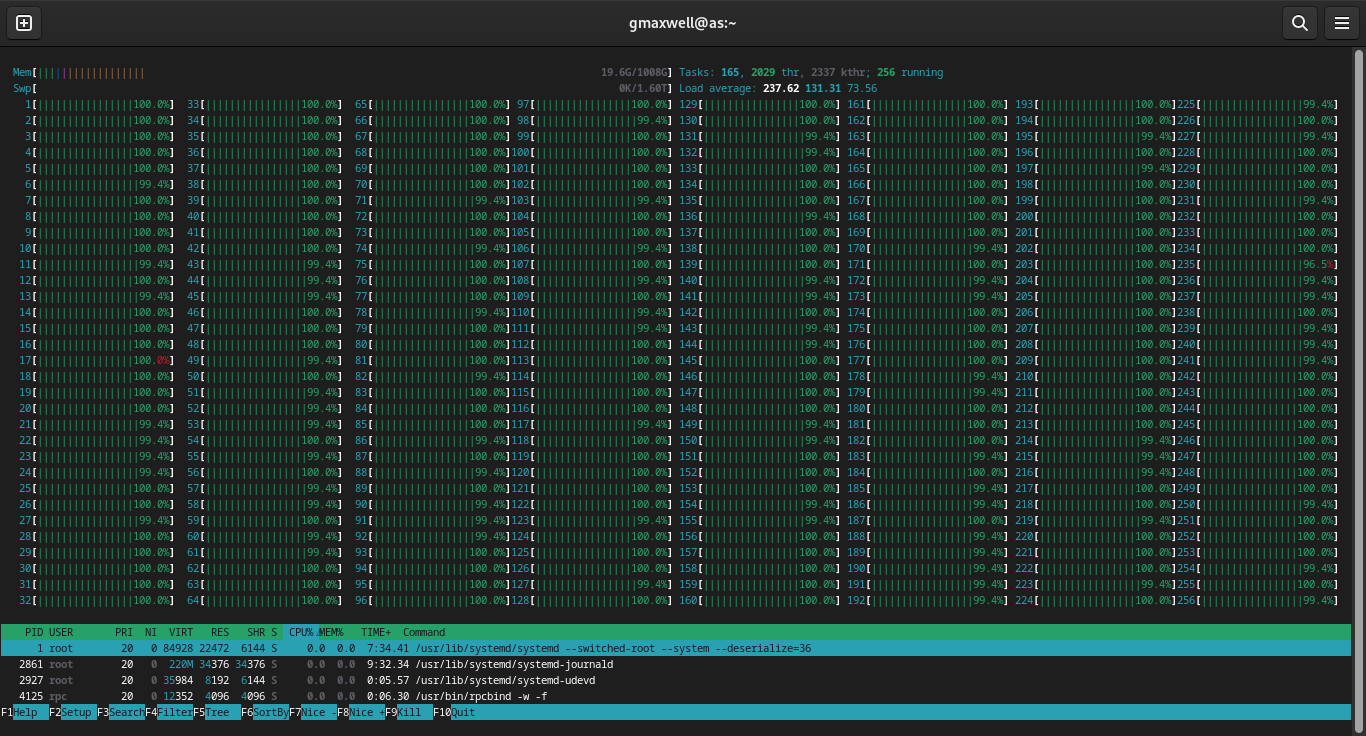
Also enjoying that core count is getting so high. Hopefully this will encourage a 256 core from AMD.
Exciting times to be a parallel programming enthusiast.